
How to Use the PS Settings Menu (SoundBase 220, 320, 420, 555 & 580)
The PS Settings menu lets you customize how your SoundBase works, including which TV remote it responds to, whether it turns off automatically, and how it powers on. Each setting has its own number that appears on the speaker’s LED display, from PS-0 to PS-14.
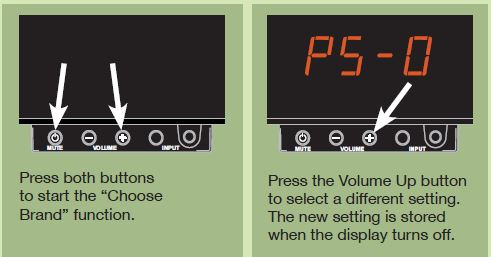
How to Change a PS Setting
- At the same time, press and hold the MUTE and Volume + buttons on the front of the speaker (not the remote) until a PS setting, like “PS-0”, flashes on the display.
- Release both buttons, then press Volume + to step through the settings until you reach the one you want.
- Stop pressing buttons. Your new setting is saved when the display turns off.
Remote Emulation Modes (PS-0 to PS-5)
These settings let your SoundBase respond to the volume and mute buttons on a remote from one of the brands below, without going through the remote learning process. Just choose the setting that matches the brand of your TV remote.
- PS-0: No brand emulation
- PS-1: Sony
- PS-2: LG
- PS-3: Samsung
- PS-4: Vizio
- PS-5: Panasonic
Note: Emulation modes only work with IR (infrared) remotes. Many “smart” remotes, like those with voice control, use RF (radio frequency) instead and may need to be switched into IR mode. Check with your remote’s manufacturer if you’re not sure.
If your remote’s brand isn’t listed, or the emulation mode doesn’t work with your remote, you can teach the SoundBase your remote’s commands instead. See Program Your Preferred Remote for instructions.
Auto Standby (PS-10 and PS-11)
- PS-10 “AS” (Auto Standby): The SoundBase automatically enters a low-power Standby mode after 20 to 30 minutes of very low or no audio signal. In most cases, this means the SoundBase will turn itself off after you turn off your TV.
- PS-11 “noAS” (No Auto Standby): The SoundBase only enters Standby when you press the Power button on the SoundBase remote or a learned remote. It will not turn off automatically.
Auto On (PS-12 and PS-13)
- PS-12 “AO” (Auto On): The SoundBase turns on in response to the Power, Volume, and Mute commands from both the SoundBase remote and a learned remote.
- PS-13 “noAO” (No Auto On): The SoundBase only turns on from a SoundBase remote command, not a learned remote. Once it’s on, it will respond to a learned remote as usual.
One Remote (PS-14)
- PS-14 “OnEr” (One Remote): The SoundBase responds only to the SoundBase remote, and any learned remote is disabled. Selecting PS-12 or PS-13 will restore your learned remote.
Still Need Help?
Please contact us at info@zvoxaudio.com or submit a new support ticket.